
“Call-in” system and multiconference capability that
drastically reduces the costs for this type of communications
SYSTEL IP control terminals are extremely powerful, flexible, economical
and practical
There are applications with different layouts and functions available in order to suit different types of operation
Talk-show, multi-conference, and external coordination system for radio, TV, and corporate environments
SYSTEL MAX is a broadcast telephony, multi-conference, and coordination system that drastically reduces communication costs, significantly improves quality, increases flexibility, and integrates seamlessly with each station’s or company’s existing telephone system. It represents a very low investment with a rapid return.

Functional
Description

SOLARIS, the Systel MAX engine, features only an information display on the front panel and a single button to access additional screens with detailed information.

As communication is entirely IP-based, the rear panel includes only five network ports, a USB port for maintenance, a CUE output, and the connectors and switches for redundant power supplies.
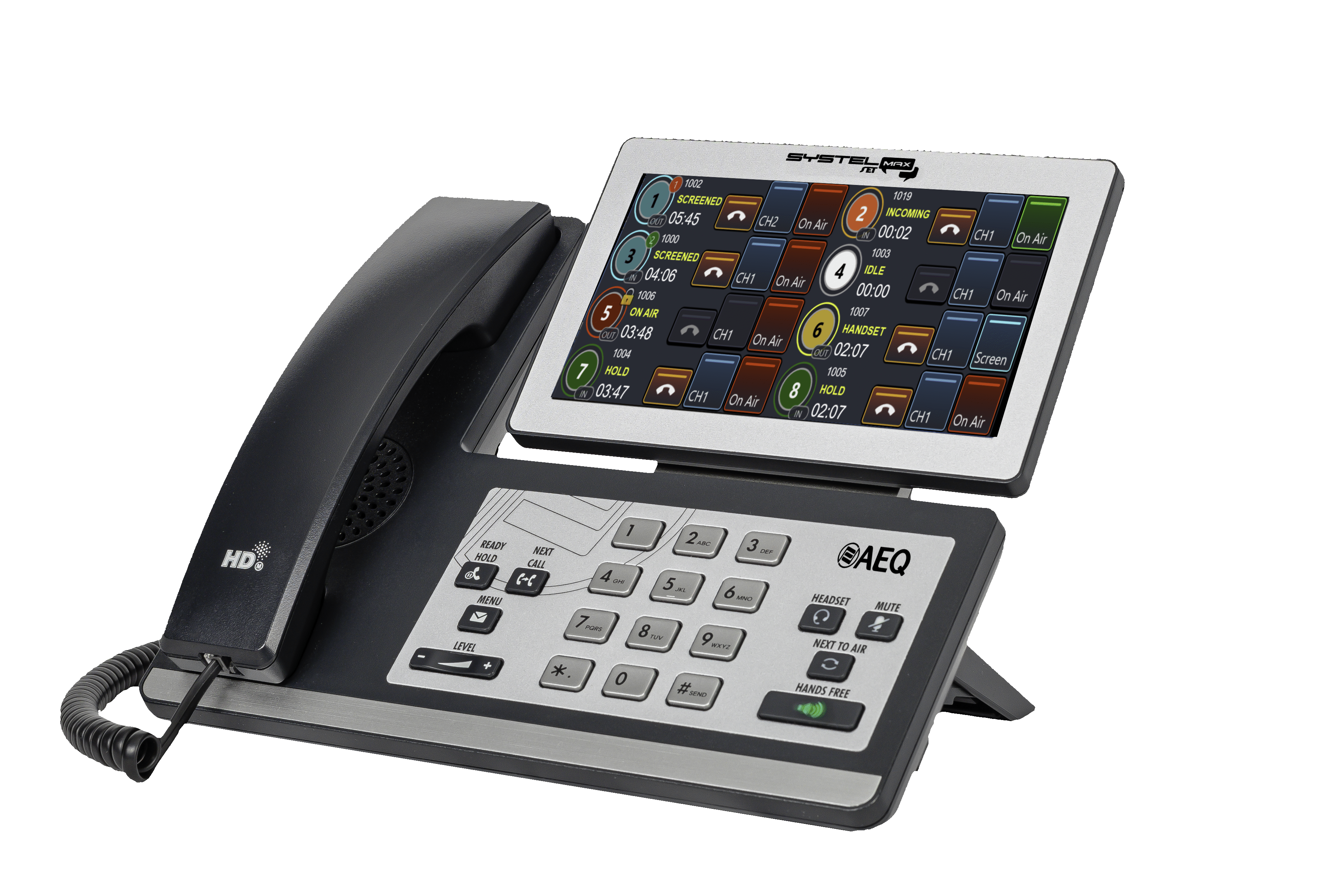
Number or name of Caller
Dynamic Key and indicator for generating or picking up calls and reflecting the current call status
Place call first in the queue
Menu
Next call
Telephone listening level
Use external headset
Mute
Putting place the next call in queue On Air
Use hands-free
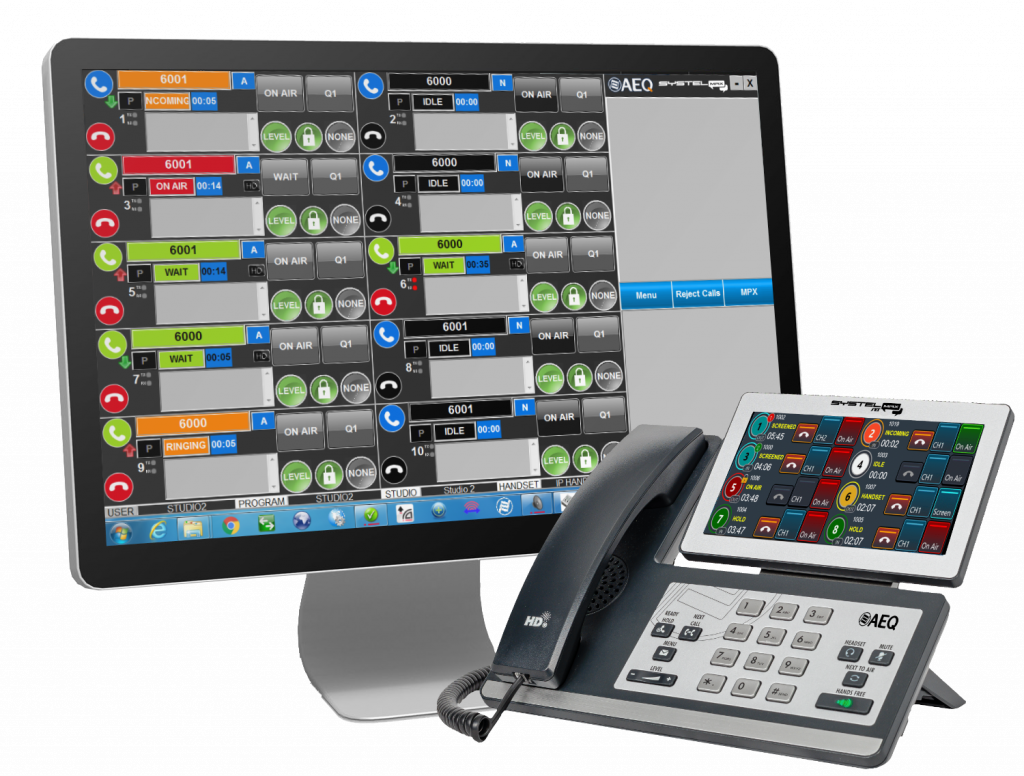
Any VoIP telephone terminal that operates using the SIP protocol can be used to make calls and communicate off-air with participants, but for Talk Show or multi-conference applications, it is recommended to use SYSTELSET, which integrates the control application into the telephone terminal.
Engine
The core of the system is “SOLARIS for SYSTEL MAX,” a 19-inch rack-mount unit with five IP ports, enabling the implementation of redundant AoIP, VoIP, and control networks.

It can activate (depending on the license) up to 128 IP telephone lines or operator telephone extensions, and 128 IP inputs/outputs using the AES67 or Dante protocol—sufficient for a multi-studio radio or television center, with support for up to 8 studios depending on the configuration.
The unit operates as a set of multi-line IP phones with SIP signaling. It is compatible with IP PBX systems, SIP trunking, and virtual PBXs. It also supports analog and ISDN telephone lines through gateways.
Control Applications
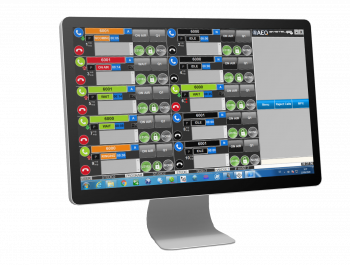
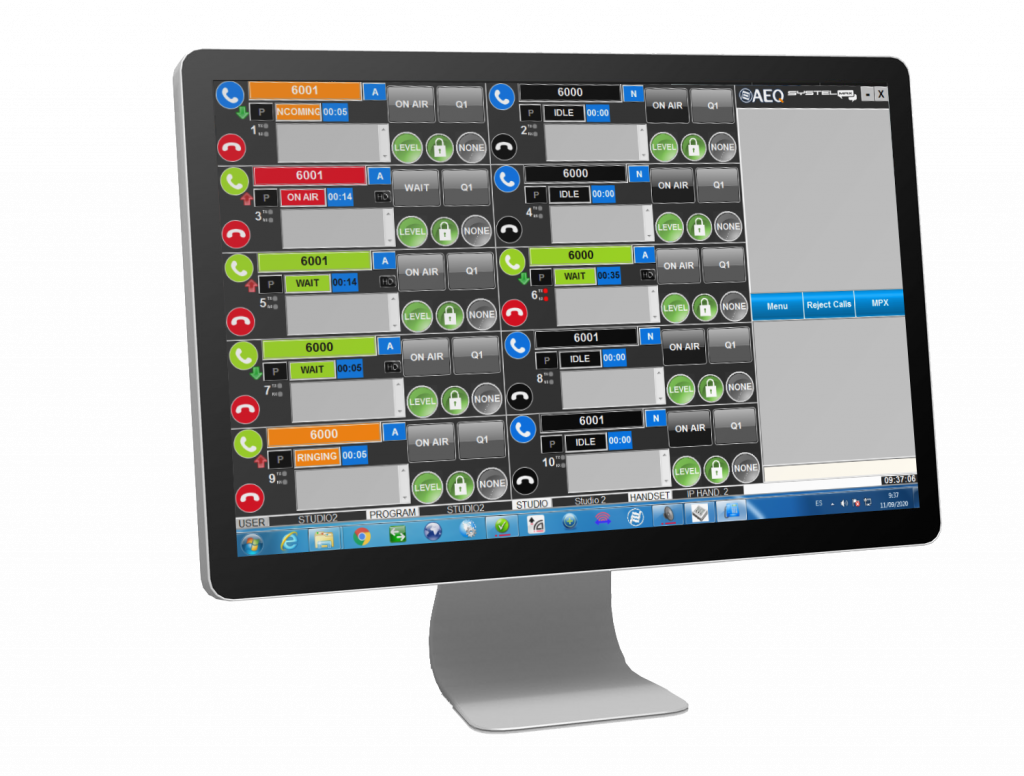
Systel IP Original
Consists of a control application on PC and a conventional IP phone. Based on call queuing, usually for radio. Best choice in high productivity environments with distributed functionality in roles such as producers, controllers and presenters.
Systel IP TV
Similar in appearance to the Original, it is multiplex-based, to provide access to intercom systems, or technical outdoor intercommunication facilities, more commonly used for television.
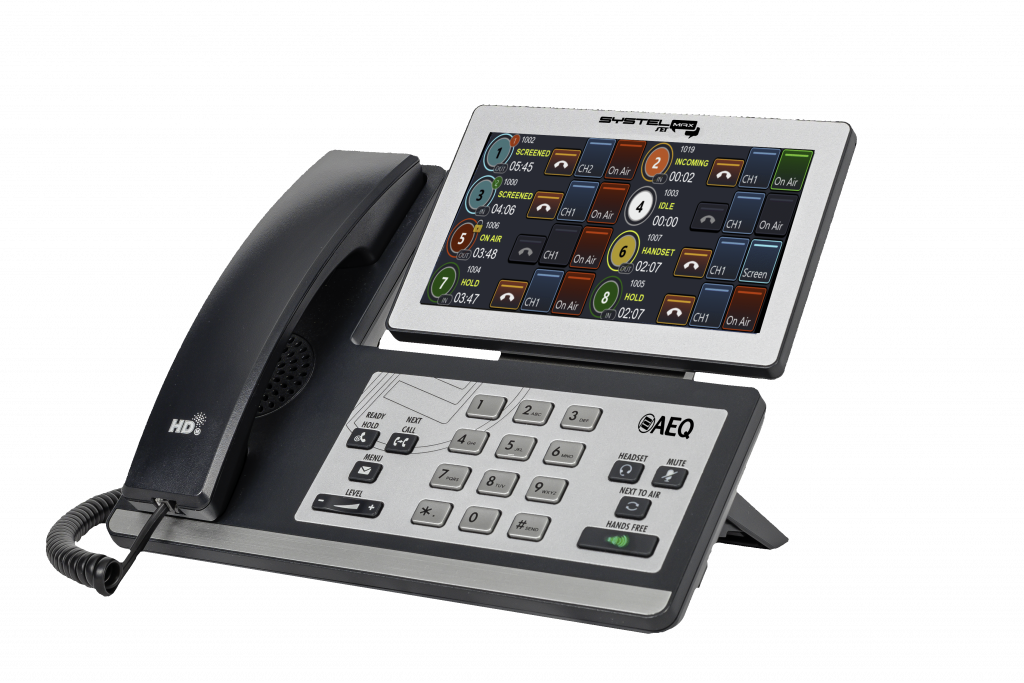
Systel SET MAX
The operating application integrated into the SYSTEL SET MAX touchscreen phone allows for very flexible operation and avoids the presence of a PC at the controls or in other confined spaces.
Technical Details
General Features
SIP Communication Protocol: Compatible with VoIP trunking, open-source Asterisk PBXs, and proprietary PBXs from major brands; SIP phones such as Phoenix Pocket and Phoenix Lite; Audiocodecs “N/ACIP compliant” like Phoenix Mercury, Phoenix Studio, Phoenix Venus, Phoenix ALIO; and FXO lines of types analog (PSTN), ISDN, E1, and T1.
Based on a non-blocking digital matrix, up to 16 lines out of a maximum of 128 can participate simultaneously in a live program without any loss of quality.
The unit routes its audio inputs and outputs via AoIP in AES67 and Dante formats. The audio characteristics depend on the AoIP equipment connected to the network, such as AEQ Forum or Capitol consoles, or AEQ Netbox interfaces.
– Telephone audio in G.711, 50 Hz – 3 kHz.
– HD audio with G.722 algorithm, 50 Hz – 7 kHz.
– Automatic gain control.
– Independent digital gain control on all inputs and outputs.
Configuration software and control server (for Windows 10 and Windows 11)
– Assigns audio circuits, handsets, IP phones, and chats uniquely to each studio.
– Renames circuits.
– Defines and manages schedules; allows users to share, edit, and copy them.
– Defines PFL signals assigned to each studio.
– Defines auxiliary and master signals assigned to each studio.
– Configures initial audio levels for each line and each studio.
– Configures client screen layouts, specifying the number of lines per program, console operation, or one/multiple call queues.
– SIP configuration for communication with IP-PBX systems, FXO gateways, external IP telephony providers (via the Internet), or internal networks (LAN/WAN).
– Differentiates and protects functionalities for different user types through access rights.
SYSTEL IP Original and SYSTEL IP TV Control Clients (for Windows 10 and Windows 11)
– Make calls by dialing numbers, SIP identifiers, or entries from schedules and agendas.
– Make calls by dialing numbers on IP phones using the IP handset functionality. Emit a visual and audible RING signal.
– Display the caller ID or number. Identify callers by name from the agenda or assign a temporary name.
– Answer incoming calls manually or automatically.
– Define and manage phone agendas, both general and private, per program.
– Register new contacts in the agenda.
– Create and manage scheduled phone calls.
– Speak via handset or headset microphone with the person on the line.
– Place calls on hold while monitoring the program.
– Put calls on air so they can contribute to the program.
– Queue calls on one or more faders ready to go on air, allowing dynamic reordering and consultation.
– Assign the VIP attribute to a call to keep it on an exclusive fader.
– Adjust headphone listening levels and the input and return levels of each studio telephone line.
– View the status of each telephone line, the time spent in that status, and where it is being routed.
– Tag calls. Chat between different controllers assigned to a program (Original version only). Manage blacklists. Block incoming calls.
SYSTEL SET MAX Control Client (for Android)
– Make calls by dialing numbers, SIP identifiers, or entries from agendas and schedules.
– Make calls by dialing numbers on the phone.
– Emit a visual and audible RING signal.
– Display the caller ID or number. Identify callers by name in the agenda or assign a temporary name from the SYSTEL IP Original app.
– Answer incoming calls manually or automatically.
– Register new contacts in the agenda.
– Manage phone agendas, both general and private, per program.
– Manage scheduled phone calls.
– Speak via handset, hands-free, or headset microphone with the person on the line.
– Place calls on hold while monitoring the program.
– Put calls on air so they can contribute to the program.
– Queue calls on one or more faders ready to go on air, allowing dynamic reordering and consultation.
– Assign the VIP attribute to a call to keep it on an exclusive fader.
– Adjust listening levels for the phone and the input/return levels of each studio telephone line.
– View the status of each telephone line, the time spent in that status, and where it is being routed.
– Differentiate and protect functionalities for producer, operator, and presenter using access rights.
– Manage blacklists and block incoming calls.
– Work with terminology and functions typical of American and European operating modes.
– Enable Dump Mode to decide whether calls go off air after being live.
– Enable Page Lines to send announcements to all lines and receive simultaneous responses.
– Enable Auto Next to move to the next call automatically after another ends.
– Enable PickUp Incoming to automatically connect with the oldest waiting call when picking up the handset.
– Enable AutoQueue to automatically queue a call after hanging up the handset.
– Enable Direct Dial to skip the line selection step when calling.
– Enable Direct Next to put calls on air even without answering them first.
SOLARIS: “Engine” for SYSTEL IP MAX
5 configurable IP ports (LAN 1 to LAN 5) for external VoIP lines, VoIP lines for control phones, control network, and primary and secondary Dante/AES67 AoIP networks. RJ45 10/100/1000 Mbps.
• Diagnostics via SNMP and Syslog.
• Universal redundant power supply: 100–240 V, 50/60 Hz, 50 VA.
• Fanless design. Silent. Cooled by natural convection.
• Operating temperature: 0 to 45 °C.
• Approximate weight: 5 kg (11 lbs).
• Dimensions: width 482 mm (19”), height 1 rack unit, 44.5 mm (1.75”), depth 300 mm (12”).
SYSTEL SET MAX: IP Phone Programmed with Control Application
– 7” multi-point touchscreen.
– 8 fully programmable function keys.
– Programmed with the SYSTELSET MAX application on Android 5.1.1.
– 12-key telephone keypad.
– Dual Gigabit Ethernet port: 10/100/1000 Mbps.
– Headset connector: 1 × RJ9 (4P4C).
– Handset connector: 1 × RJ9 (4P4C).
– USB 2.0 port for wired or wireless USB headsets.
– HD Voice.
– Speakerphone.
– External power supply 100–240 VAC, 5V DC, and PoE (IEEE 802.3af), class 3, max 6W.
– Dimensions (W × D × H × T): 259.4 mm × 235.2 mm × 194.5 mm × 42.6 mm.
– Weight: 916 g.